SovereignStack — On-Prem AI in One Command
SovereignStack packages on-prem AI — inference, gateway, chat workspace, vector database, RAG pipeline, and observability — into a single hardened appliance you run on your own hardware, replacing weeks of platform engineering with one install command. Built for law firms, hospitals, and anyone bound by data-residency requirements, it keeps documents off any external cloud, with privacy locked on by default (metadata-only tracing, no prompt content) and nothing phoning home.
Every company wants the same thing from AI right now: the usefulness of ChatGPT, pointed at their own documents, without handing those documents to someone else’s cloud. For a law firm, a hospital, a defense contractor, or anyone bound by a data-residency clause, that isn’t a preference; it’s mandatory. Data cannot leave the building.
The technology to do this on your own hardware has existed in the open for a while. The problem has never been whether it’s possible. The problem is that assembling it is hard.
The Swamp
Say you decide to stand up private AI yourself. Here is the checklist, roughly in the order it ruins your week:
- An inference server. Pick one (vLLM, sglang, TensorRT-LLM), match it to your GPU, and get the CUDA drivers, toolkit, and container runtime lined up so it actually sees the card. Now do it again for embeddings, because generation and embeddings are usually separate processes competing for the same GPU memory.
- A model gateway. (LiteLLM or custom) Something to hand out API keys, enforce rate limits and budgets, give models stable names, and route requests. Configure it, hide its admin surface, keep it patched.
- A chat and document workspace. (OpenWebUI, AnythingLLM, etc) A front end your staff will actually use, wired to the gateway, with document upload and retrieval.
- A vector database. (faiss, chromadb, pgvector, Qdrant) design the schema, and own the index lifecycle — dimensions, versioning, and the rebuild dance every time you change embedding models.
- A RAG pipeline. Chunking, embedding, retrieval, and the glue between all three.
- Postgres and migrations for application state, plus auth — admin users, sessions, tokens.
- Observability. Prometheus for metrics, Grafana for dashboards, Loki for logs, an OpenTelemetry collector, and tracing — configured so it captures metadata and not your users’ prompts.
- A reverse proxy and TLS, and a Docker Compose file that wires a dozen services together with the right dependencies and health checks.
- Model management. Download weights, pin immutable revisions, handle access tokens, verify what you pulled.
- Backups and a tested restore, evaluations and benchmarks to know whether a change made things worse, and a supply-chain story so you can trust every image you’re running.
None of it is exotic. All of it is real. Put together, it’s weeks of an experienced platform engineer’s time to get running — and then it’s yours to maintain, patch, and debug at 2 a.m., forever. That gap between “possible” and “practical” is exactly where most private-AI ambitions die.
What We Built Instead
SovereignStack is that entire stack, assembled, hardened, and delivered as a single appliance you run on hardware you own. Nothing phones home. Nothing leaves the machine.
We didn’t reinvent the ecosystem — we integrated the best of it and made it behave like one product. Under the hood, it’s proven open source: a tuned fork of vLLM for inference, AnythingLLM for the workspace, PostgreSQL + pgvector for storage and retrieval, and Prometheus, Grafana, Loki, and OpenTelemetry for observability. On top sits the part that makes it an appliance rather than a pile of containers.
The design follows one invariant: one product, one control plane, one gateway, one runtime endpoint. Requests flow in a straight line — and each layer has exactly one job.
Workspace → Gateway → Runtime → your local accelerator- Sovereign Runtime is the clever core. Instead of running separate servers for chat and embeddings, it serves multiple model roles — generation and embeddings — from a single process on a single port, dividing GPU memory deliberately rather than by luck. One endpoint, many jobs.
- Sovereign Control is a single Go binary with an embedded web UI. It detects your hardware, picks the right profile, downloads and pins models, manages gateway keys and budgets, runs evaluations, and handles backups — the whole operations surface behind one login.
- Sovereign Gateway gives every model a stable name and enforces keys, budgets, and rate limits, so the workspace never talks to the runtime directly.
- Everything runs on Docker Compose — no Kubernetes, no cluster, no SRE team required. It’s built for a Mac Studio or a single GPU workstation in the corner of an office.
Two design decisions matter more than the rest. Privacy is locked on by default: tracing captures metadata only — model names, token counts, timing — never prompt or response content, and turning content logging on takes a deliberate administrator action. Backups deliberately exclude model weights. And the manifest is honest — the system reports what it’s actually doing (which accelerator, which backend, what embedding dimensions it measured), so you’re never guessing.
The Complexity, Annihilated
Here’s the before-and-after.
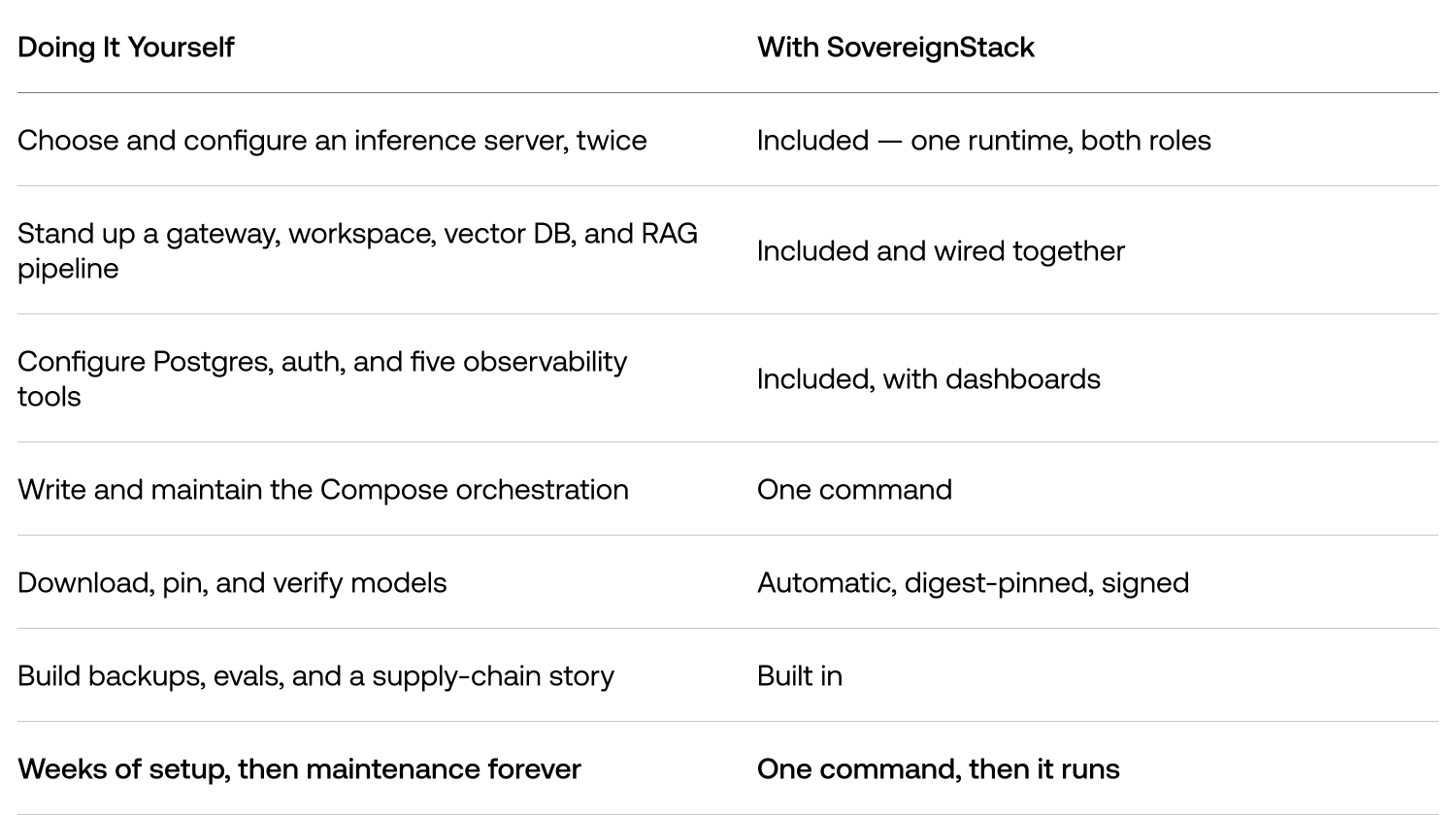
That one command detects your hardware, verifies a cryptographically signed release, generates its own credentials, pulls digest-pinned images, starts everything, waits for the runtime to come up, and runs a smoke test to prove it works — before it hands you a URL.
And because model policy is warn, don’t block, you’re not locked to what we shipped: point it at a Hugging Face or local model you prefer, and it’ll tell you if that model hasn’t been validated on your hardware rather than refusing.
Install It
SovereignStack v0.1 is a public preview with two certified profiles: Apple Silicon Macs and Ubuntu NVIDIA hosts. The same command works on both — it detects which one you’re on.
What you need first:
- Mac: Apple Silicon with 32 GB+ unified memory, and Docker Desktop with Compose v2.
- NVIDIA: Ubuntu 24.04 (x86_64), a GPU with 24 GB+ VRAM, Docker Engine with Compose v2, the NVIDIA driver, and the NVIDIA Container Toolkit.
- Both:
curl,tar,openssl, a running Docker daemon, and ~20 GB free disk (60 GB recommended if you keep model weights). The installer checks these and never touches your Docker, drivers, or OS packages.
Install:
curl -fsSL https://raw.githubusercontent.com/Lazarus-AI-Research/sovereign-stack/v0.1.0-rc.3/deploy/scripts/install.sh \
  | SOVEREIGN_VERSION=0.1.0-rc.3 bash
The first run takes a while — it’s downloading a signature verifier, container images, and model weights. Leave it running until it prints your local URL and the path to your generated credentials.
To pick a profile explicitly instead of auto-detecting:
# Apple Silicon
curl -fsSL https://raw.githubusercontent.com/Lazarus-AI-Research/sovereign-stack/v0.1.0-rc.3/deploy/scripts/install.sh \
  | SOVEREIGN_VERSION=0.1.0-rc.3 bash -s -- --profile metal-arm64

# Ubuntu NVIDIA CUDA
curl -fsSL https://raw.githubusercontent.com/Lazarus-AI-Research/sovereign-stack/v0.1.0-rc.3/deploy/scripts/install.sh \
  | SOVEREIGN_VERSION=0.1.0-rc.3 bash -s -- --profile cuda-x86_64
First use:
# add the CLI to your PATH if it isn't already
export PATH="$HOME/.local/bin:$PATH"

# confirm the release, validate config, check health
sovereign version
sovereign validate
sovereign status
Then open it in your browser:
- Workspace (chat and documents): http://127.0.0.1:8880/
- Sovereign Control (admin): http://127.0.0.1:8880/control/
Your admin login was generated during install — read it with:
cat "$HOME/.sovereign/credentials"Sign in to Control to inspect the active local models, add a remote provider with an encrypted credential, manage embedding profiles and indexes, run evaluations, and configure backups. Then head to the Workspace, create a space, drop in some documents, and start chatting — over models running entirely on your own hardware.
Day-to-day, the whole appliance is one CLI:
sovereign up        # start / update, wait for readiness, run the smoke gate
sovereign status    # health at a glance
sovereign logs -f sovereign-runtime
sovereign backup    # everything but the weights
sovereign down
By default the appliance binds to localhost only. Exposing it to a network is a deliberate step that needs your own TLS reverse proxy and a security review — your data stays on your machine until you decide otherwise.
That’s the point of the whole thing: the shortest path between “we can’t put this in the cloud” and a working private AI your team can actually use. One command, on hardware you already own, with nothing leaving the building.